
Browsers
How to Export Passwords from old Firefox 59 Google Chrome 49
Written 12 Aug 2021 · Last changed 17 Nov 2026
How to export passwords from old Firefox (ex 59), Google Chrome (ex 49) and Internet Explorer
I was moving data from an old Windows Vista computer to a new laptop. One of the steps is how to export passwords so later I can easily import them on the new system. Unfortunately in earlier versions of Firefox and Google Chrome there is no option to export those. There is no way to update those browsers to a newer version as they are not supported.
The solutions on the internet apply only to the newer versions of Firefox and Chrome. After that I remembered a piece of software I used in the past. It is still there online, FREE to download.
The program name is WebBrowserPassView. The version I used is v2.11.
After downloading from the nirsoft website and installation I was able to see passwords from all browsers in one place.
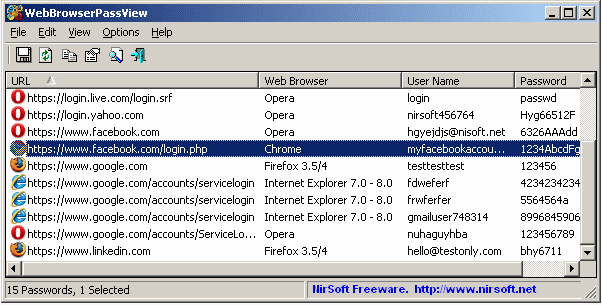
I selected all of them and pressed the save button.
I have to mention that WebBrowserPassView has an option to save those records in one of a few formats, starting from txt or csv to a format recognised by any modern browser. It makes it easy to import later.
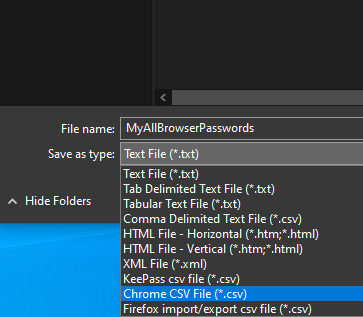
BTW the program comes in zip format and is portable (installation is not required). It is enough to unzip it and you are ready to export passwords from all browsers in your Windows installation. The program comes with different language versions. It makes it easier to recover old browser passwords. You can download the software and solve your issues with exporting passwords from old versions of Chrome, Firefox and Opera here.
If you still require help during the process of recovering or exporting passwords, you can order support services on our website. We will help you. For security reasons you should NEVER let anyone see your exported passwords. We can teach you how to achieve your goal.
Still stuck? Sign in to open a case or call +353 85 134 4444.